Buy online, pick up in store — with no dead ends.
End-to-end journey concepts for in-store pickup of devices and gateways ordered online: from the store receiving the order, to packing, check-in, handoff, and activation. Four product and design teams each owned a piece; the concept work stitched them into one path a store rep could follow without ever getting stuck.

> Internal system, tool, and platform names generalized for public portfolio use.
Empathy → Define → Ideate → Prototype → Test & iterate.
Empathy
Followed one order from the customer's couch to the store's back room, through every screen, person, and handoff it touched.
Define
Split the journey into the phases and ownership areas it really has, and set one rule for all of them: no dead ends.
Ideate
Worked out how the same handoff behaves when the customer arrives with two intents, one intent, or none.
Prototype
Drew the full in-store journey as wireframe flows — scan and pack, check-in, deliver the bag, activate — plus a same-day-delivery version.
Test & iterate
Marked what was still open — billing impact, activation timing, review-and-discover content — instead of drawing over it.
The problem: one order, many workspaces, no single path.
A customer orders a gateway and two phones online and picks them up at a store as soon as two hours later. Behind that simple promise sits a chain of separate tools: a store queue showing what needs packing, a scanner flow for packing devices, a check-in step, a customer-facing workspace for the handoff, and an activation tool for the phones. Each was owned by a different product and design team, and none of them was designed with the others in mind.
The first job was to walk the whole thing end to end, in plain language, with named personas at each step: what the customer sees at home, what the packer sees when the order lands, what the rep sees when the customer walks in, and what has to be true at each handoff for the next person to succeed.
- Handoffs between workspaces were the weak points: the rep leaves the store queue for a customer workspace, then needs to come back and close the session.
- Not every path was built yet. A recommended step could point at something that didn't exist, leaving the rep with nowhere to go.
- Orders can't be modified, but must be fulfilled first. Anything the customer wants beyond the order has to wait until the pickup is complete.
Three phases, four owners, one rule.
The journey settled into three phases, each living in a different place: Scan & Pack (before the customer arrives), Delivering a Bag (check-in through handoff), and Activation (getting the phones working). The ownership map matched them: the store queue and check-in, the device scan-and-deliver paths, phone activation, and a fourth, still-forming "review and discover" path for service and billing recommendations.
| Decision | Rationale |
|---|---|
| Scan & Pack is a guided path launched from the store queue | Packing devices is a sequence — view order, scan the core device, scan each phone, print receipts — so guidance beats a free-form screen. |
| Customer is authenticated before the devices are handed over | The customer proves who they are with a one-time passcode sent to their email, so pickup can't be completed by someone else. |
| The rep chooses the order of the recommended paths | Review & discover, deliver bag, and activate phones all recommended; the rep picks the order based on how busy the store is. |
| Activation doesn't gate delivery | If phone activation isn't ready or takes longer, the customer can still leave with their bag; activation is a separate path. |
| Every session ends back at the queue | Closing the customer workspace returns the rep to the "in progress" queue so the next customer in line is one tap away. |
The same handoff, three ways in.
What happens after check-in depends on how much the customer tells the rep. The concept designs for all three cases so none of them dead-ends:
- Two intents (for example: pick up the order and compare a bill): the rep follows the recommended pickup path, returns to the conversation, then continues into the second path.
- One intent (just pick up the order): the recommended path runs, then the session ends.
- No intent: the rep sees a manual path list — search, start, cancel, and resume any path themselves.
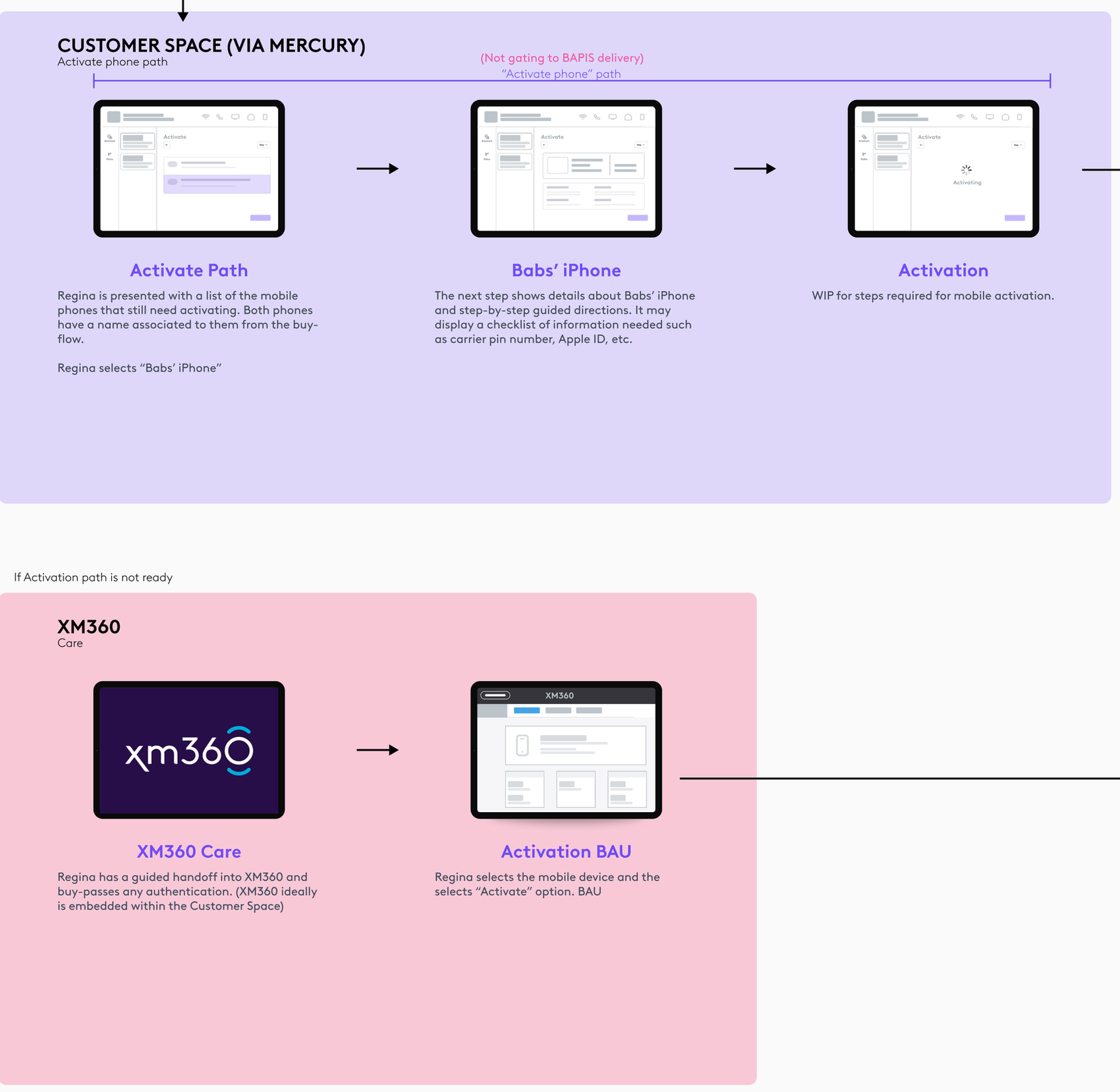
The same "no dead ends" rule covers paths that don't exist yet. When a recommended action has no path built, the rep gets a deep link into the existing tool in a separate browser window, and coming back to the customer workspace is one step away. The same approach covers activation: if that path isn't ready, the rep is handed off to the existing activation tool with authentication already handled.
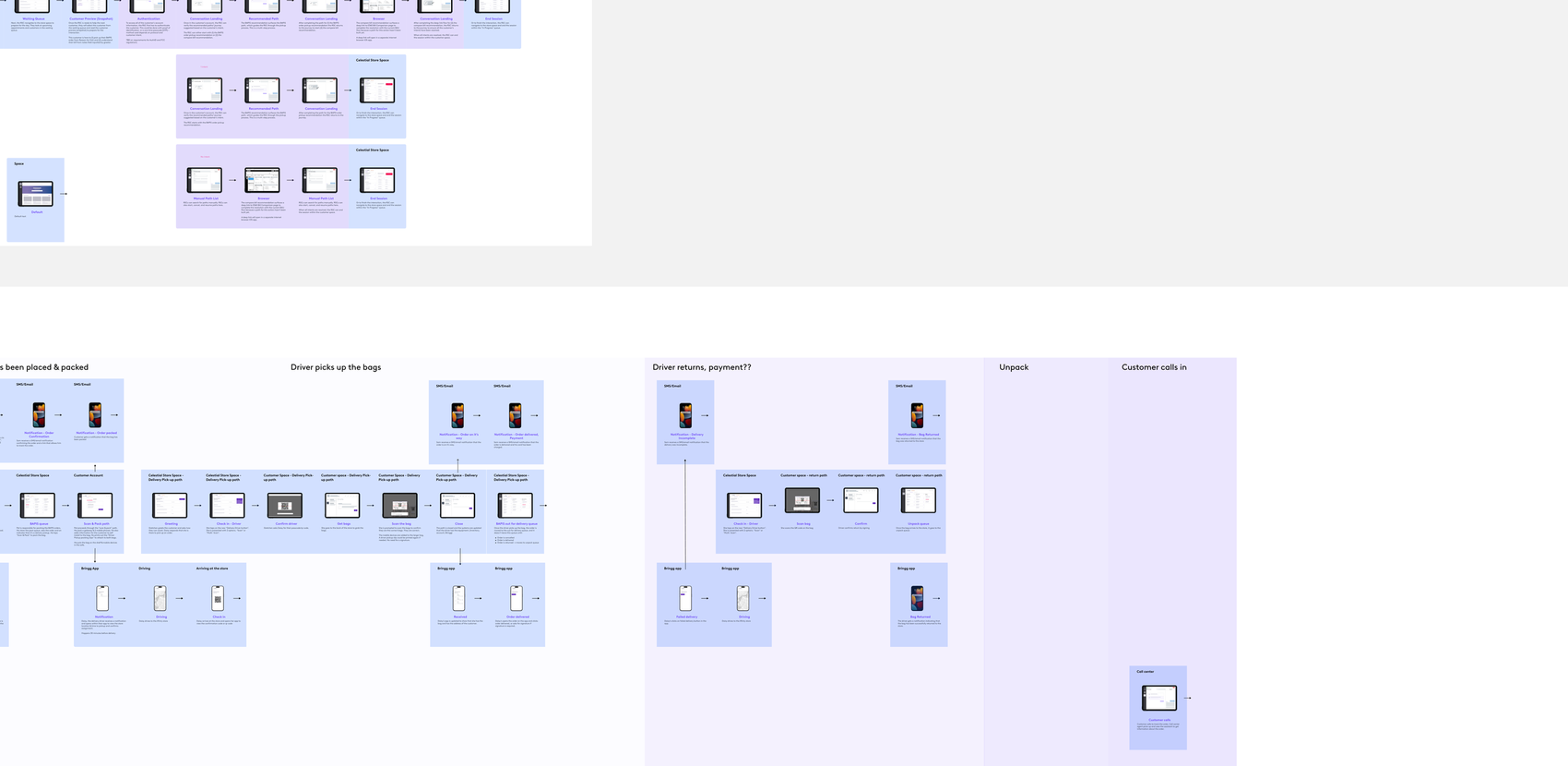
The full in-store journey, drawn end to end.
The ideal flow was documented as a set of connected wireframe journeys, each step captioned with what the person is doing and what the system does in response, so product, design, and engineering could all read the same story.
The store is notified of a new order and sees it in the pack queue, with devices to pack and the customer's appointment time. The packer launches the Scan & Pack path: view the order, scan the core device's barcode, scan each phone's IMEI (and SIM if needed), bag each device separately, print receipts with QR codes, and stage the bags. The store queue updates to show the bag is packed. Inventory is associated with the account, but not yet assigned.

The customer walks in and is welcomed by a greeter. Their account and reason for visit already come attached to the order, so check-in only needs visual identification and visit details. They join the waiting queue; when a rep is free, they see a snapshot of the customer — who they are, why they're here, and that the bag is already packed — and start the customer workspace with a warm introduction.

After authentication, the rep gets the recommended paths and can start with review-and-discover: service and billing information, and a few questions ("how many people are in your home?") to make sure the customer has the right services. Then comes Deliver Bag: the rep fetches the packed bags from the back of house, scans each bag's QR code to confirm it's the right one, reviews a summary of changes with the customer, and submits. Devices are added to the account, billing is processed, and a receipt prints. The path ends with an automated notes summary and a friendly close.

The final question of the path is whether the customer wants to activate a phone now, in store, or later at home (if they booked an appointment during the buy flow, that choice can be pre-selected). Activation lists the phones that still need it — each named from the buy flow — shows a step-by-step checklist of what's needed, like a carrier PIN or Apple ID, and activates. If that path isn't ready, the rep is handed off to the legacy activation tool, embedded where possible, with authentication carried over.
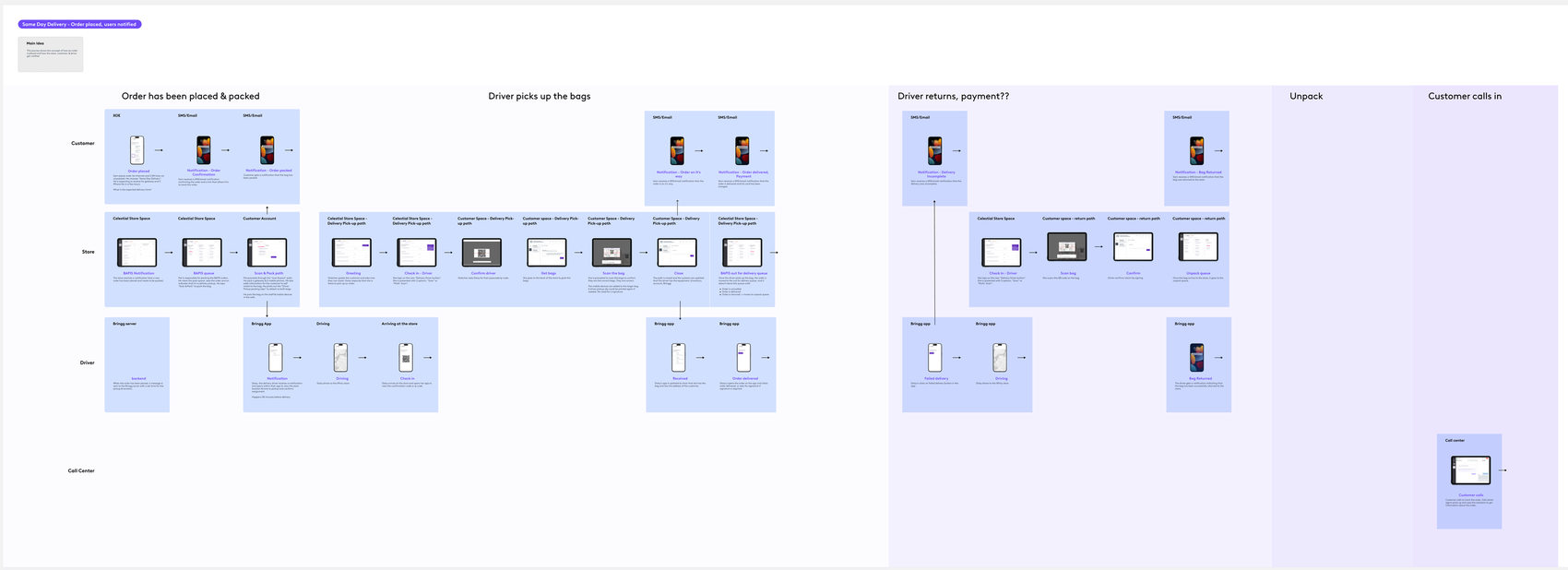
The concept was then extended to same-day delivery, where a driver picks up the bags instead of the customer. The journey is drawn as a swimlane across customer, store, driver, and call center: order placed and packed; driver checks in and store confirms the driver, scans each bag, and closes; customer gets a notification when the order is on its way and again when it's delivered; and the failed-delivery path where the driver returns the bag, the store scans it back in, and it lands in the unpack queue. The call center gets its own lane so an agent can see the order's status when a customer calls in.
Concept phase, stated plainly — and the open questions.
This work is journey concept and discovery. It hasn't been built, so there's no usage data and no usability results to report. What it did produce is a shared, reviewable picture of the whole experience, and a clear list of what still needs an answer before build:
- Billing impact: what happens to billing when devices are added at handoff is still to be confirmed with requirements.
- Activation timing and embedding: whether the existing activation tool should be embedded in the customer workspace, opened in a pop-over, or opened in a browser is undecided.
- Review & discover: the service-and-billing recommendation path is still in discovery, so it sits in the concept but isn't gating pickup.
- Delivery edge cases: the same-day-delivery lane's return and payment steps are still marked open.
Two intents, one intent, and no intent — none of them dead-ends.
In-store pickup and same-day delivery, on the same backbone.
Next: usability testing of the in-store flow with store reps, and closing the open questions above with the teams that own each path.