267 case types. One guided path in.
Modernization strategy for an internal employee case-management system — connecting guided troubleshooting, automation, and AI-assisted ticket creation so frontline agents no longer had to manually navigate a sprawling legacy case taxonomy. Phase two layered a conversational AI assistant on top: translation, auto-summarization, ticket tagging, and a member-facing trial experience, all scoped and prioritized against real ticket data.

> Internal system, tool, and platform names generalized for public portfolio use.
Empathy → Define → Ideate → Prototype → Test & iterate.
Empathy
Re-kicked off a stalled initiative, turning a scattered set of stakeholder conversations into a written framework covering goals, scope, blockers, and ownership.
Define
Mapped all ~267 case types against how each should be handled, and defined the resolution order every one of them has to follow.
Ideate
Ran a How-Might-We pass against every step of the support conversation, then prioritized the resulting feature list by effort vs. impact.
Prototype
Built an agent-facing AI copilot concept, a member-facing conversational trial experience, and a working POC mockup — sequenced by validation priority.
Test & iterate
Validated the concept against real historical ticket data before writing a single line of production code.
The problem: Agents were manually navigating a system with ~267 case types.
The legacy case-management system contained roughly 267 distinct support case types, each with its own required intake questions. Agents had to determine the correct case category themselves, fill in the required information, and route the issue manually — a process that was slow, error-prone, and inconsistent, with no guided path connecting troubleshooting to case creation.
This work had previously stalled before I re-kicked it off — resetting stakeholder expectations, scope, and timeline explicitly at restart. Rather than jump back into screens, the first output was a written kickoff framework: main goal, key strategy, integration points, open challenges, and leadership priorities — something the whole stakeholder group could align to before design work resumed.
The restart conversations surfaced a consistent shape: go headless (frontline agents interact through a conversational layer, never the legacy system directly), route unresolved path fallout into auto-created tickets rather than silent drop-offs, and protect role-based visibility restrictions rather than build workarounds around them. Leadership was explicit that stakeholder buy-in and clear visualization — journeys, wireframes, roadmaps — mattered as much as the design itself, given how recently the initiative had stalled once already.
Every decision traded scope for reliability.
The kickoff synthesis got turned into a small set of standing decisions — the rules every subsequent design choice had to respect, agreed on before any screen was drawn.
| Decision | Rationale |
|---|---|
| Troubleshooting and automation attempted before a case is ever created | Avoids generating unnecessary tickets and pushes resolution earlier in the flow, reducing both agent effort and case volume. |
| An AI assistant recommends the path and supports ticket creation | Removes the requirement for agents to manually open the legacy system and self-classify from ~267 options. |
| If the assistant can't resolve or confidently classify the issue, hand off pre-filled rather than dead-end | The conversation still ends in a resolution path — a human agent, not a wall — with account details carried forward instead of re-collected. |
| Customers get notification and follow-up visibility after escalation | Even when a case can't be resolved immediately, the customer isn't left without status information. |
| Proof of concept scoped to 1–2 high-volume cases first | Keeps the first implementation tractable and testable rather than attempting to solve the entire taxonomy in one pass. |
Before any AI-assisted screen was designed, the team agreed on a small naming convention for who's "speaking" in a given surface: in the agent-facing copilot, the AI is a distinct assistant coaching the human agent. In the member-facing trial experience, the AI speaks as the frontline agent — "I" is the agent, "You" is the member — so the interaction pattern the member sees matches what they'd get from a human, and everything the assistant does could, in principle, be said by the agent it's standing in for. That single convention kept a dozen otherwise-independent mockups consistent.
A feature list built from the conversation itself, not a wishlist.
Rather than brainstorm features in the abstract, the ideation pass walked the actual support conversation step by step — customer starts talking to the bot, gets transferred to an agent, the agent reads the chat and answers, the agent can't resolve it and creates a case, category gets selected, data gets entered, the call ends — and asked "how might we help the agent" at each one. Every idea had to trace back to a specific step and a specific pain point.
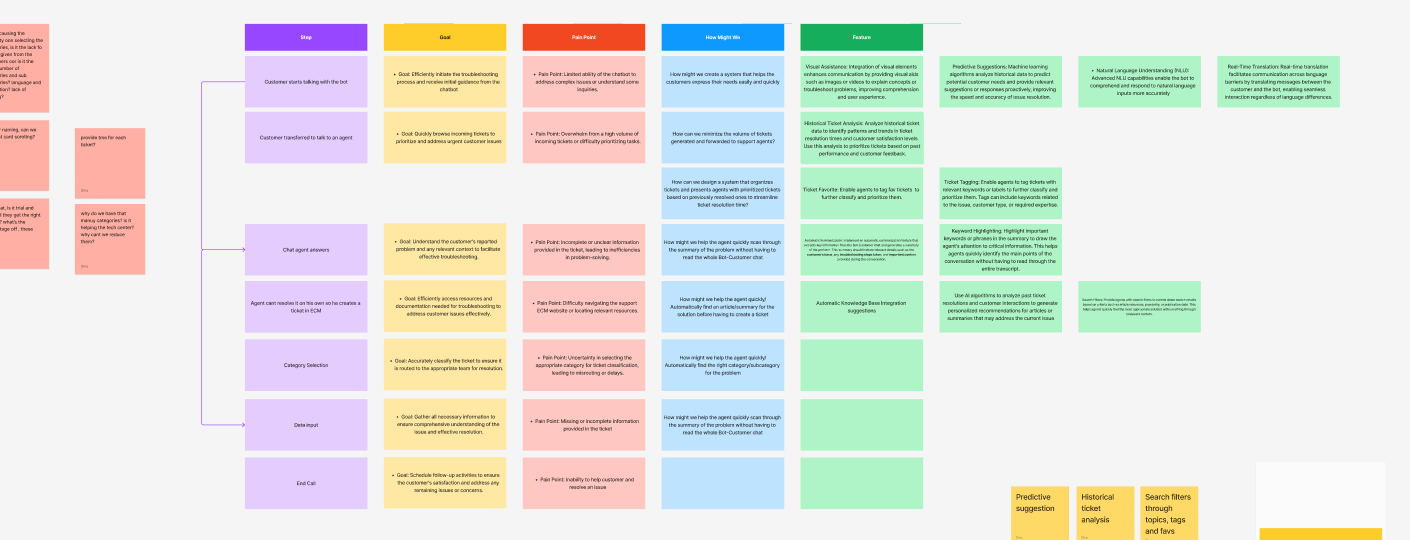
That pass produced a feature list spanning three needs: quick answers (predictive suggestions, automatic knowledge-base suggestions, keyword highlighting during long chat transcripts), speed (ticket tagging, ticket favoriting, historical ticket analysis, automatic ticket creation), and access (real-time translation and natural-language understanding for customers who don't speak English as a first language, and image recognition so an agent can get a diagnosis straight from a photo of the hardware).
Every feature idea had to trace back to a validated pain point before anything moved to a wireframe. The process became a repeatable roadmap: validate the pain points and suggested features, weigh effort against impact to find the high-value/low-effort ideas, run a technology feasibility check, then move those into conceptual wireframes for stakeholder alignment and, eventually, usability testing.
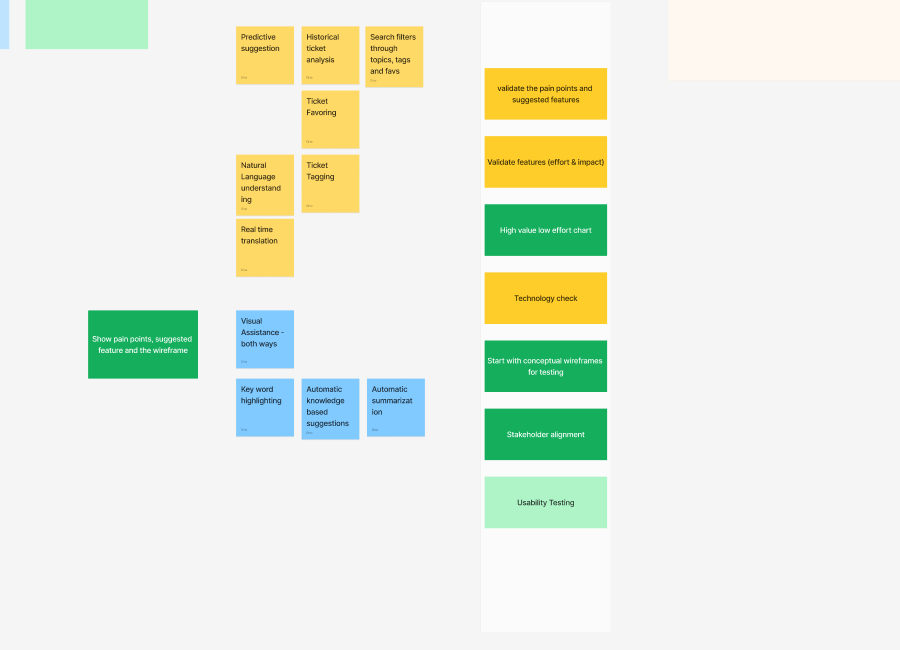
Validate pain points & features → weigh effort vs. impact → technology check → conceptual wireframes → stakeholder alignment → usability testing. Usability testing is the one stage not yet reached.
Three concepts, three different jobs.
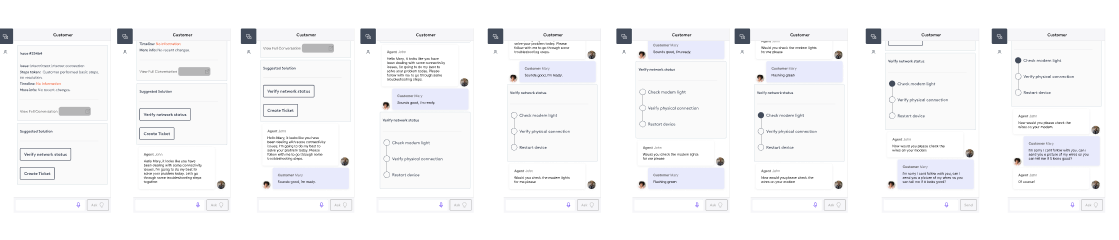
The prioritized features split into an agent-facing copilot layer inside the existing case-management tool, and a separate member-facing conversational trial experience for a small set of frontline agents to test directly. A third artifact — a working POC mockup — packaged the highest-priority flow for technology and stakeholder validation.
Inside the existing support tool, the assistant sits alongside the agent rather than replacing their screen: real-time translation and NLU so a non-English-speaking customer can be helped without a language barrier, and automatic ticket tagging so tickets get classified and prioritized without an agent hand-typing categories under time pressure.
- Conversation & history summary: summarizes the current chat and a customer's past tickets so an agent isn't reading a full transcript to get context.
- Automatic solution suggestion: speeds up resolution and helps newer agents with AI-generated next-step advice.
- Image recognition: lets an agent get a detailed diagnosis from a photo of the hardware instead of a description alone.
These concepts, along with a stakeholder-facing "what it is, why it matters, how it works" presentation, were used to build support for the initiative beyond the immediate project team.
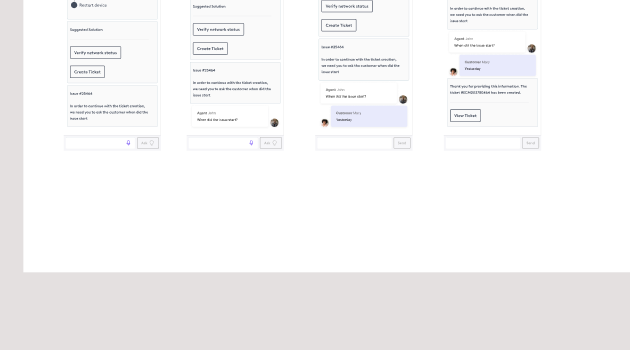
A separate, smaller-scope concept: what if a member could talk directly to a conversational AI agent, with a live agent only pulled in if the AI couldn't resolve or safely classify the issue? Scoped to a handful of frontline agents for an initial trial rather than a full public rollout.
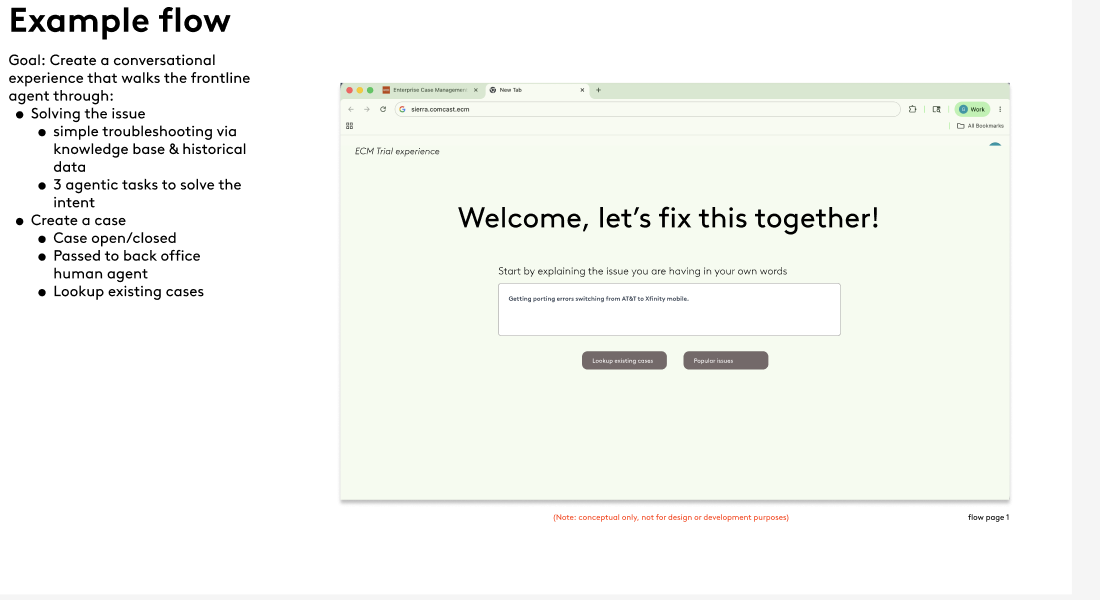
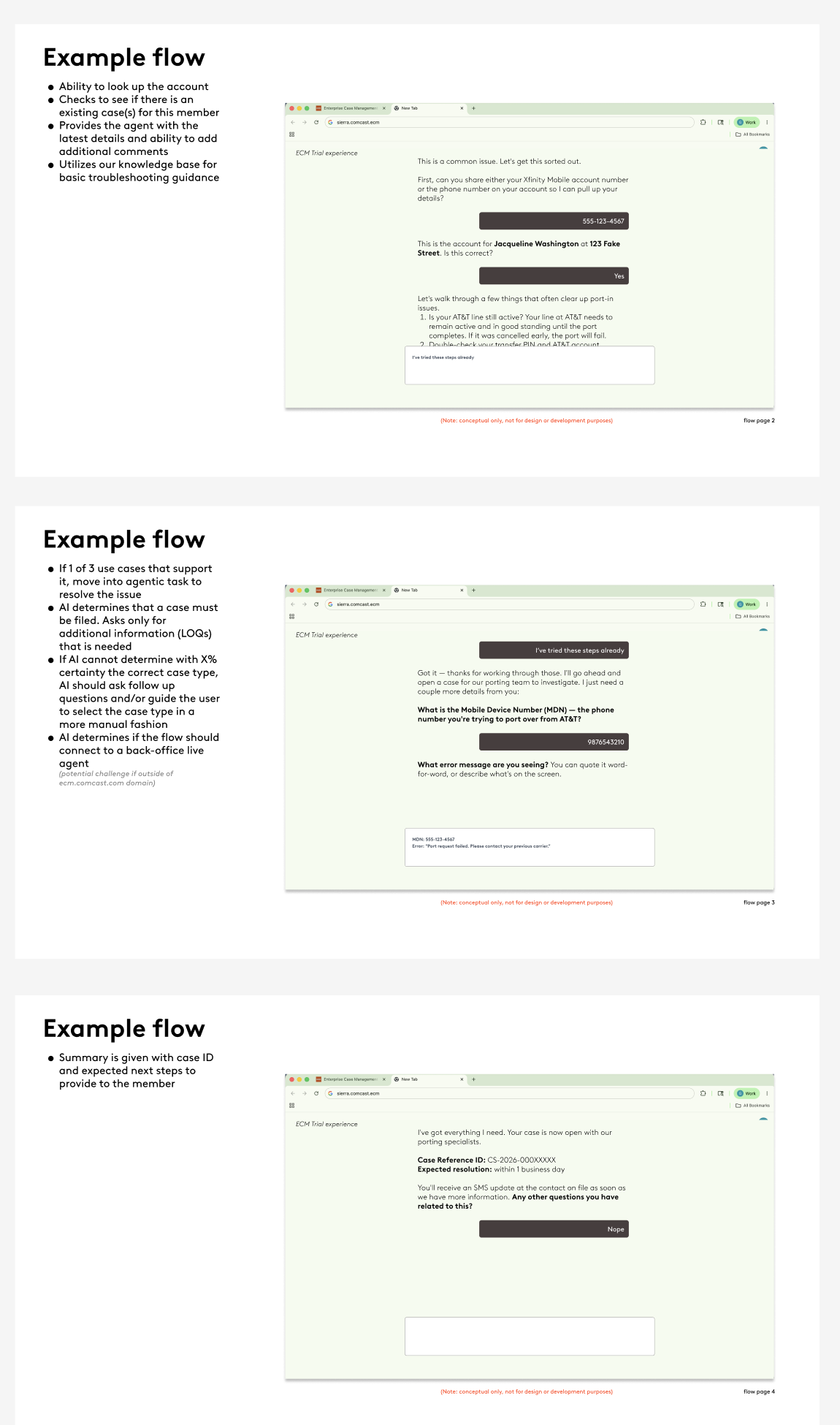
Two design rules kept the trial experience from becoming a dead end: it always starts with the agentic troubleshooting experience before anything else, and if the AI genuinely can't handle a case type, the conversation still resolves — handed off with account information pre-filled rather than making the member start over.
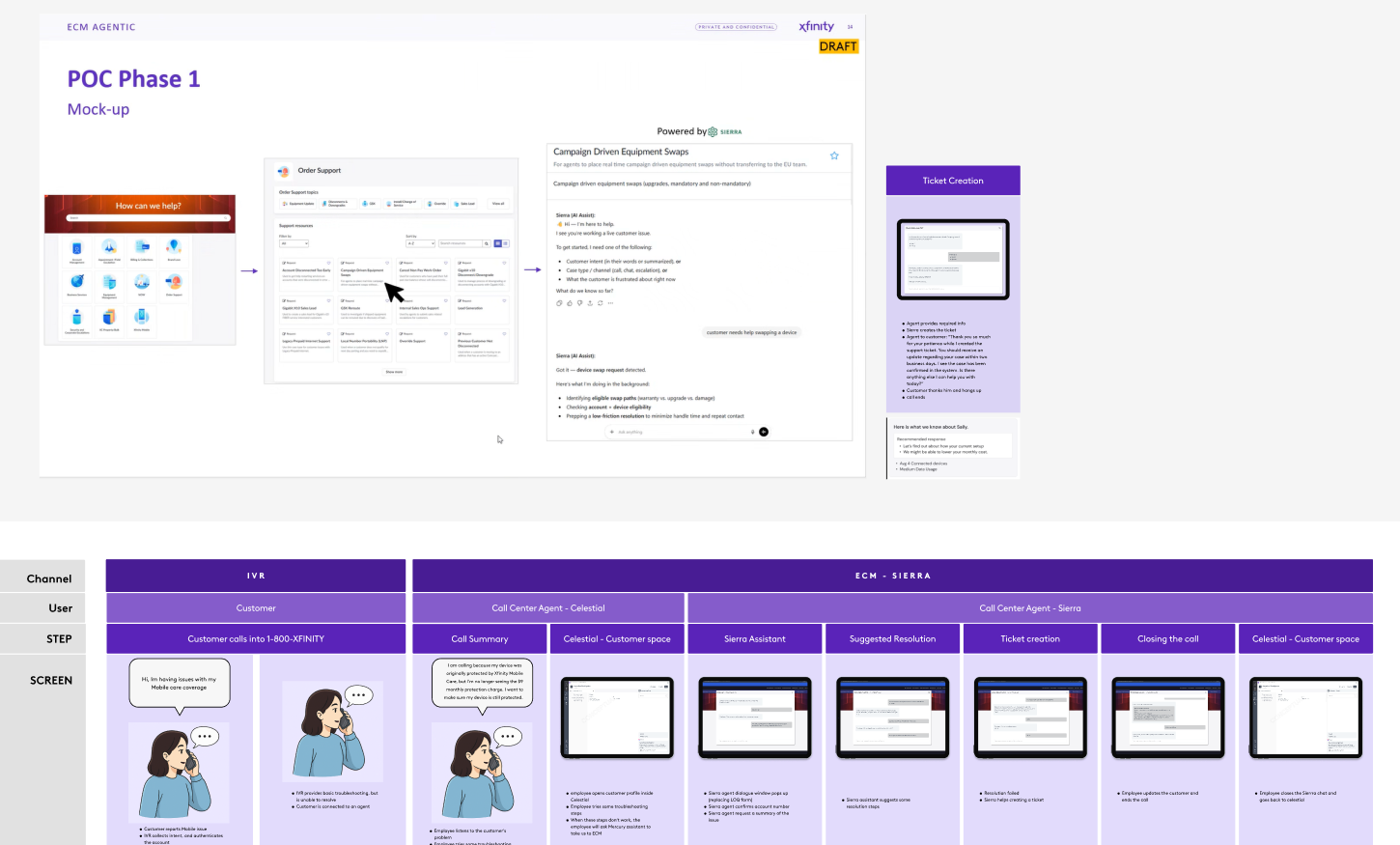
Validated against real ticket data before writing production code.
Rather than wait for a live pilot to find out whether the concept solved a real problem, the team ran a manual audit of historical tickets for one of the highest-volume case types being considered for the first proof of concept. The review found that roughly half of all submissions under that case type were misrouted — filed there for reasons unrelated to the category's actual intent, when the real issue belonged under a different support path entirely.
Manually reviewed historical tickets for a high-volume case type showed over half were filed under the wrong category.
Every legacy case type classified into one of the resolution paths defined in Define.
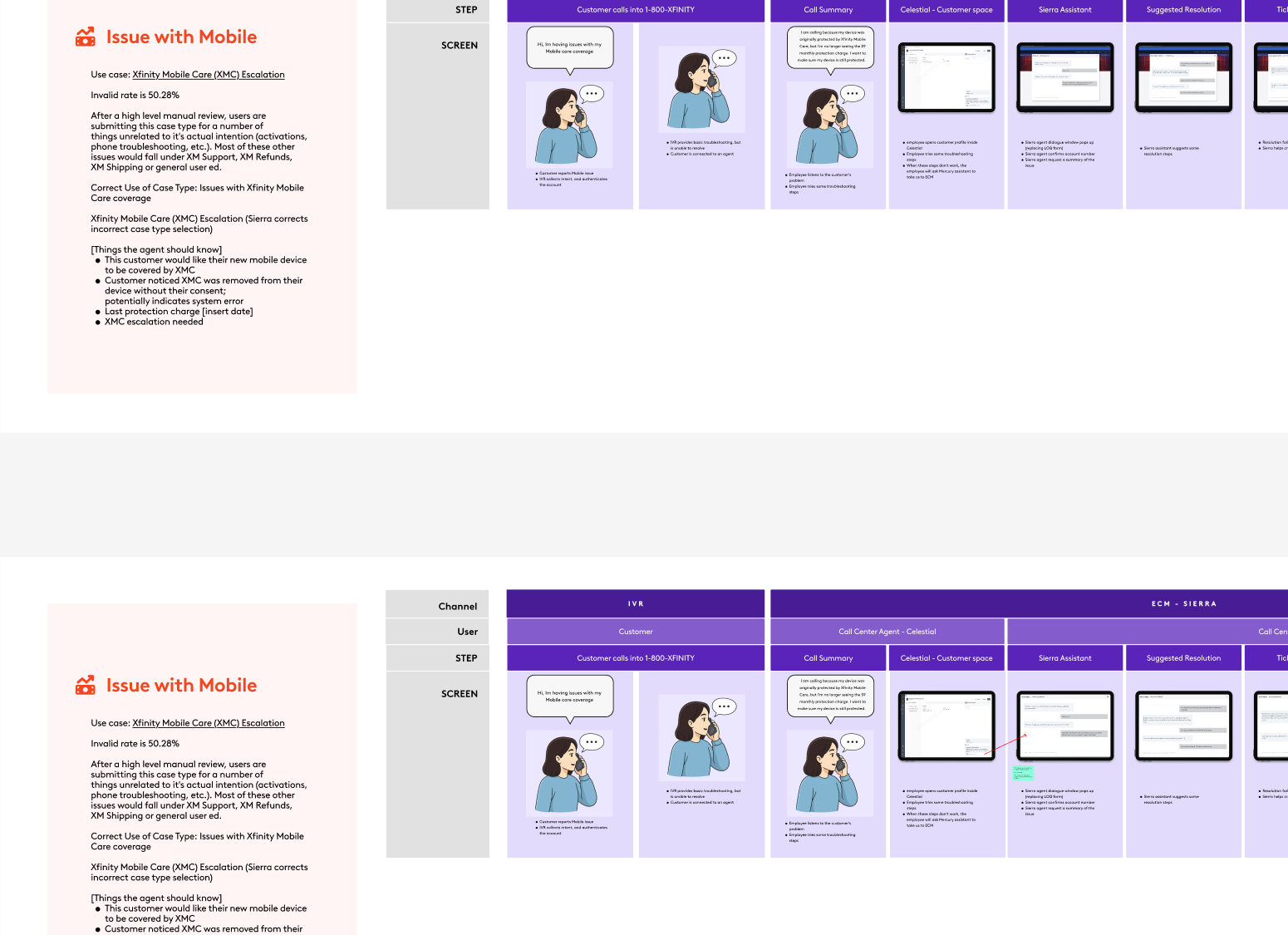
That number became the argument for scoping the first proof of concept to this case type specifically — a correction the AI assistant is explicitly designed to catch, since it asks for intent before it ever proposes a category. This project restarted mid-2025 and was still active as of the latest available documentation, with proof-of-concept scoping and technology validation underway. The POC mockup and trial experience have been validated against real historical ticket data and internal stakeholders, but not yet against live users — usability testing is the next step in the roadmap, not a completed one, and that's stated here plainly rather than implied.
What's next, and what I'd carry forward.
- Usability testing of the trial experience and copilot concepts with frontline agents — the one roadmap stage not yet reached.
- Widen beyond the first case type once the proof of concept holds, using the same misrouting review to pick the next one.
- Stakeholder alignment on integration principles and visibility restrictions before any build begins.
- Restarting a stalled initiative starts with words, not screens. A written framework everyone could align to did more than any early mockup.
- Real data beats opinion. One manual review of historical tickets made the case for the proof-of-concept scope better than any argument.
- Design for the fallback. A conversational assistant is only trustworthy if it never dead-ends, so the human handoff is part of the design, not an exception.